

- Why AliExpress invoices are a nightmare for accountants
- The hidden costs of manual data entry and human error
- Introducing the solution: SIM83 Converter
- Additional functionality: Conversion of NLB statements to ISO SEPA XML
- How does the conversion process work in practice?
- Free download and installation of the software
- Free activation procedure
- Conclusion: Optimisation is the key to success
Modern business requires a constant search for optimal solutions, cost reduction and the identification of reliable suppliers. Over the last decade, the AliExpress online platform has become one of the most popular destinations for Slovenian companies looking for specific components, spare parts, office supplies or products for resale. Low prices and a huge selection are certainly attractive, but the real nightmare for business owners and accountants only begins once the purchase has been made. When these purchases need to be properly accounted for and brought into line with local legislation, it quickly becomes apparent that the administrative burden often eats up all the savings we made through the bargain purchase.
In this article, we will explore in detail why obtaining and recording invoices from AliExpress is so problematic, what the hidden costs of manual data entry are, and how you can fully automate this process using our new tool, SIM83 Converter.
Why AliExpress invoices are a nightmare for accountants
Anyone who has ever ordered equipment or materials via AliExpress for business purposes has encountered their specific and often frustrating invoicing system. When you add multiple products to your online basket, you are often purchasing them from different sellers within the platform itself. Instead of AliExpress issuing a single, consolidated B2B invoice for the entire purchase, the system generates separate documents for absolutely every item or each individual seller. So, if you’ve ordered twenty different small items for your production, you’ll receive twenty separate invoices.
However, fragmentation is not the only problem, nor is it the biggest one. The biggest problem lies in the format of these documents themselves. AliExpress often provides invoices in PNG image format. PNG (Portable Network Graphics) is an excellent format for displaying logos and web graphics, but it is completely unsuitable for business and accounting documentation. This is because the image format does not contain structured text data that can be easily copied or machine-read. It is merely an image of the text. For modern business, which is moving towards paperless and automated accounting, such a format is a major step backwards.
The hidden costs of manual data entry and human error
Due to the PNG format and the huge number of separate invoices, accountants are forced into the most time-consuming and unproductive task: manually transcribing data. Let’s see what this means in practice. The accountant must open each PNG image, read the issue date, find the supplier’s name, and transcribe the invoice number, amount, currency and, of course, any tax details.
This leads to two key problems. The first is a huge waste of time. Manually entering twenty invoices, which may be worth only a few dozen euros in total, can take an accountant several hours of valuable time. If we calculate the hourly rate of an accounting service or your employee, we quickly realise that the administrative cost far exceeds the purchase value of the products themselves.
The second, even more dangerous problem is human error. When endlessly and monotonously transcribing numbers from unclear images, it is easy to overlook a decimal point, mix up the order of the digits in a date, or transcribe an invoice number incorrectly. In accounting, such errors are unacceptable. Incorrect bookkeeping can lead to incorrect VAT calculations, difficulties in reconciling balances and, in the worst case, penalties in the event of an audit. You can read more about the requirements and rules regarding tax validation and the posting of invoices in Slovenia on the official website of the Financial Administration of the Republic of Slovenia (FURS).
Introducing the solution: SIM83 Converter
At Blog 83, we recognised this specific pain point for Slovenian entrepreneurs, so we developed a dedicated software solution. We are delighted to present SIM83 Converter – an innovative tool that completely eliminates the need for manually transcribing AliExpress invoices.
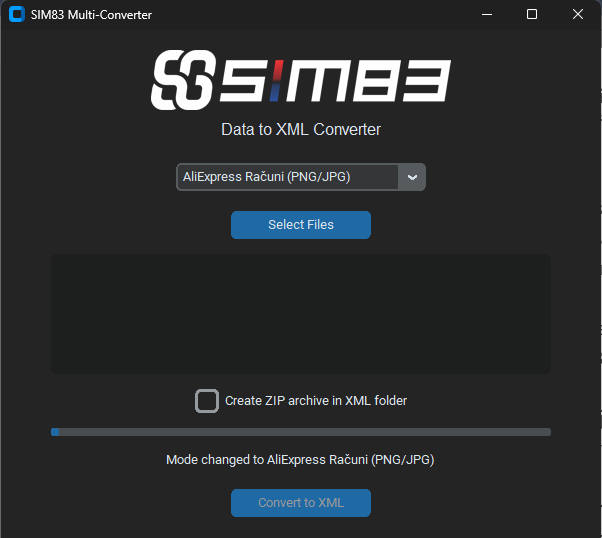
Our converter is designed with simplicity and efficiency in mind. It works by taking your downloaded PNG files from AliExpress, analysing them using advanced text recognition algorithms (optical character recognition), and extracting all key accounting data from them. It then structures this data and converts it into a standardised XML document that is fully compliant with the Slovenian e-Slog standard.
The e-Slog standard is the unified Slovenian standard for electronic commerce, supported by virtually all modern accounting software in Slovenia (Minimax, Pantheon, E-računi, Vasco and others). By using our converter, your PNG image is transformed into a structured XML document in a matter of seconds, which you can simply import into your software. No typing, no wasted time and, above all, no errors. For a deeper understanding of e-business standards and e-invoices in Slovenia, we recommend visiting an information portal offering support to businesses, such as those provided by the Bank of Slovenia or the Chamber of Commerce.
Additional functionality: Conversion of NLB statements to ISO SEPA XML
As we wanted to create a truly versatile tool to ease accounting headaches, we didn’t stop at AliExpress invoices. Many businesses face yet another administrative hurdle: bank statements in PDF format.
Although most banks already offer exports in XML formats, in practice it is still common for business owners to send statements to their accountants in PDF format. For now, we have focused on Slovenia’s largest bank, Nova Ljubljanska banka (NLB). SIM83 Converter includes an extremely useful feature that takes an NLB bank statement in PDF format and accurately converts it into ISO SEPA XML format (camt.053 standard).
This functionality enables all banking transactions – incoming and outgoing payments, dates, references and amounts – to be automatically converted from a static PDF document into a machine-readable format. The accountant then simply imports this XML into their software, which automatically links payments to open items (invoices). Here too, the time saved is measured in hours, and the accuracy is 100%. In the future, we plan to add support for other Slovenian banks as well, but the current support for NLB already solves problems for a large number of users.
How does the conversion process work in practice?
Using the SIM83 Converter app is extremely intuitive. We have prepared a brief overview of how the process works from start to finish:
- Gathering documents: Download all PNG invoices for your latest purchase from the AliExpress portal. Also, save a PDF statement from your NLB online banking to your computer.
- Launching the application: Open the SIM83 Converter programme on your computer.
- Selecting a function: In the user interface, choose whether you want to convert AliExpress PNG invoices to e-Slog XML or NLB PDF statements to ISO SEPA XML.
- Import and conversion: Upload the files to the programme. With a single click, the programme processes all documents. Even if you upload fifty PNG files at once, the programme will process them in a very short time.
- Export to accounting: The programme saves the prepared XML files to your chosen location. You can then easily import these files into your accounting software (via the “Import e-invoices” or “Import bank statements” function). All items will be automatically allocated correctly.
With this approach, you or your accounting team will complete your monthly bookkeeping significantly faster. You can read more about how automation impacts business growth in our other blog posts.
Free download and installation
The best news of all is that the solution is currently available completely free of charge. We realise that businesses need to optimise their costs, which is why we are offering SIM83 Converter as a tool that will immediately improve your operations without any initial investment.
You can download the installation file safely and quickly directly from our server via the link below: Download SIM83 Converter here
This is a standard Windows installation file (.exe) which you simply run on your computer and follow the quick on-screen instructions. The programme takes up very little space and does not put a strain on your system.
Free activation process
Once the programme has been successfully installed on your computer, you will need an activation code for it to work fully. We have made this step as simple as possible and, most importantly, (for now) completely free of charge.
To obtain your unique activation code, simply send us a short email with your request to our email address: sim@83.si.
There is no need to fill in lengthy forms in the email; a brief request to activate the SIM83 Converter programme is sufficient. Our team will send you the code in a reply as soon as possible. You then enter this code into the programme when you first launch it, thereby unlocking all its features – including unlimited conversion of AliExpress invoices as well as conversion of NLB statements.
Conclusion: Optimisation is the key to success
In the business world, where time is money, we cannot afford to waste precious hours on routine, manual tasks that technology can perform faster and more accurately on our behalf. Fragmented PNG invoices from AliExpress and PDF statements are a relic of the past, and accountants no longer need to struggle with them.
By downloading and using our SIM83 Converter programme, you’ll take a significant step towards digitising and automating your back-office operations. Don’t delay – download the app today, request your free activation code at sim@83.si, and let smart software do the work for you. Your accounting team will thank you for it.