

Introduction: The uninvited passenger
You’ve invested in top-of-the-range equipment. A direct-drive steering wheel, load-cell pedals and the crowning glory: a full-motion simulator. You buckle up, excited to feel every bump on the Nürburgring circuit, but after three laps you don’t feel the adrenaline – you feel a cold sweat and your stomach churning.
This is motion sickness (or, more precisely in this context: simulation sickness). It is the silent killer of immersion, turning a top-tier hobby into a physical endurance test that nobody enjoys.
At SIM83, we believe that motion should enhance the experience, not ruin it. Today, we’ll delve into the science behind why this happens and present two concrete, tried-and-tested solutions that we’ve verified on our own simulators: peripheral vision management and motion profile optimisation.
The Science: It’s All in Your Head (literally)
To solve the problem, we must first understand the mechanism. Simulation sickness is primarily caused by Cue Conflict Theory.
Your brain relies on three systems to determine where you are in space:
- The visual system: What your eyes see.
- The vestibular system: What your inner ear (the balance organ) senses.
- Proprioceptive system: What your muscles and joints feel (pressure in the seat, tension in your arms).
Conflict
In a real car, when you drive into a bend, your eyes see the curve, whilst your inner ear senses a sustained G-force pushing you to the side.
In a simulator, even on the most expensive motion platform, it is not possible to create sustained G-forces (unless you are driving in a centrifuge). The simulator tilts to simulate the force using gravity. If the simulator tilts but your eyes see a different rotation speed on the screen – or if there is a slight delay (latency) between the image and the movement – your brain goes into panic mode.
The brain interprets the mismatch between vision and balance as a sign that you have been poisoned or are hallucinating. The biological response? Nausea, intended to expel the ‘poison’.
Solution 1: The problem with peripheral vision (Side monitors)
One of the most surprising triggers for motion sickness in a simulator is the triple-screen setup. Although three screens offer an incredible field of view, they can be the main culprit for motion sickness if they are not set up perfectly.
Peripheral sensitivity
Human peripheral vision is evolutionarily designed to detect movement. It is extremely sensitive to “optical flow” – the speed at which objects rush past you.
In a motion simulator, when the platform tilts forwards, backwards or sideways (pitch and roll), the relationship between your eyes and the side monitors is constantly changing, unless the screens move along with the simulator. If your screens are static (mounted on a separate stand) but your seat is moving, the horizon line on the side monitors in your peripheral vision will jump up and down.
This jumping around is disastrous for your vestibular system. Your central vision is focused on the track (which looks stable), whilst your peripheral vision sees the room (or the edges of the monitors) jumping around.
Fix: Turn off the side screens
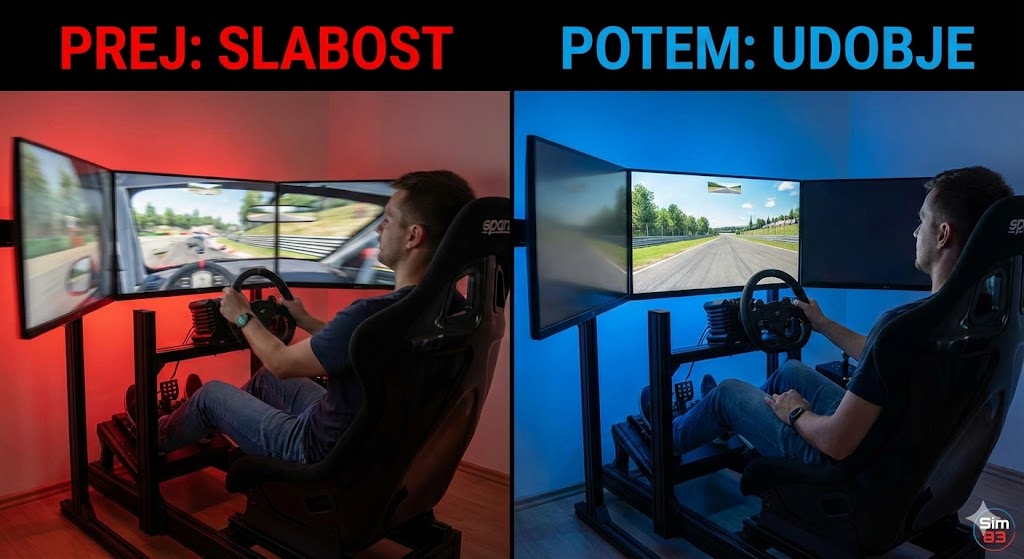
As we demonstrated in our latest testing (see video below), one of the most effective immediate remedies for severe simulation sickness is to switch off the side monitors.
By limiting your view to a single central monitor, you eliminate conflicting peripheral stimuli. You confine the “visual flow” to the area where your focus is strongest. This reduces the sensory load on your brain and allows it to synchronise the simulator’s physical movement with the visual data on the main screen much more easily.
If you cannot part with the three screens, ensure they are mounted on the motion simulator itself so they move in perfect synchronisation with your head, or use software to dim the edges of the screen during rapid movement.
Solution 2: The “Less is More” Approach (Reducing Motion)
The biggest mistake new owners of motion simulators make is setting all parameters to 100%. We call this the “Rollercoaster Fallacy”.
New users often think: “I’ve paid for 150 mm of travel, so I want to use all 150 mm.” However, the suspension of a real racing car is extremely stiff. A GT3 car does not tilt 20 degrees backwards when you put your foot down; visually, it barely moves, even though the G-forces are enormous.
Movement Cues versus Displacement
The simulator cannot replicate the distance travelled by the car; it replicates the initial cues (the initial burst of acceleration) and uses gravity to simulate the sustained force (rearward tilt).
When you set the movement too high:
- Excessive tilt: The simulator tilts too much. Your brain knows the car isn’t doing this. A conflict arises.
- Washout Lag: The simulator needs to return to the centre (washout) to be ready for the next bump. If the movement is too large, the “return journey” becomes noticeable. You feel as though you are floating or moving backwards when you shouldn’t be.
Fix: Reduce the “Gain”
In our test video, you’ll see how we drastically reduced the motion effects.
- Reduce Global Gain: Start at 30–40% of what you think looks “cool”.
- Smooth out the filters: Increase the smoothing settings in your motion software. This removes the sharp, violent jolts that shake your skull (and inner ear) without adding to the immersion.
- Prioritise detail over range: You want to feel the texture of the road and the loss of grip, not the sensation of being on a boat in the middle of a storm.
By reducing the range of motion, you minimise the discrepancy between what the eyes see (a stable car) and what the body feels. The movement becomes a subconscious cue rather than a conscious distraction.
Practical test (Video analysis)
We didn’t just theorise this; we put it to the test.
In the video above, pay attention to the change in settings:
- Side monitors disabled: We switched to a single central focal point.
- Smoother motion profile: The simulator no longer jerks violently. The movements are subtle, precise and communicative.
The result? Our test driver (or in this case, female driver), who had previously felt discomfort within 10 minutes, was able to complete the entire 45-minute ‘stint’ without any discomfort. Lap times also improved, as the driver wasn’t fighting against the simulator but listening to it.
Conclusion: A setting for comfort is a setting for speed
Nausea in sim racing is not a sign of weakness; it is a sign of a setup that is not biologically optimised. Your brain is a finely tuned instrument, and if you feed it conflicting data, it will reject it.
By simplifying visual inputs (turning off side monitors) and refining physical inputs (reducing gain), you bridge the gap between the virtual and the physical.
Summary of steps to overcome this weakness:
- Step 1: Switch off or cover side monitors to reduce conflict in your peripheral vision.
- Step 2: Reduce the “Motion Gain” (try reducing it by 50% and gradually increase it).
- Step 3: Ensure that the frame rate (FPS) is high and stable.
- Step 4: Use a fan to blow air onto your face (a tried-and-tested trick for reducing the feeling of nausea).
Good luck on the track!